YMEC software
| TOP
| STORE
| DSSF3
| RAE
| RAD
| RAL
| MMLIB
| FAQ
| Support
| Contact Us
|

This site provides information for how to perform the
sound measurement and analysis by using standard Windows PC. Realtime Analyzer, Sound
Analyzer, and Environmental noise Analyzer turn your PC into a
measurement laboratory. Covered field is audio measurement and adjustment, room
acoustics, electronic measurement, acoustic analysis of noise, human voice, musical instrument, and
medical auscultation sound. You can do the same measurement by your own notebook
PC. Go to YmecStore
to download the sound measurement and analysis software DSSF3.
| Japanese | English |
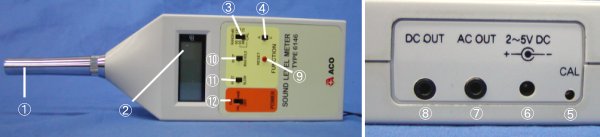
OPERATION OF A SOUND-LEVEL METER (ACO 6146)
SPECIFICATIONS

| 1 |
Microphone |
1/2-inch
electret condenser microphone. |
| 2 |
Display |
Measurement
result, over-scale, under-scale, and battery life are displayed.
Levels are shown with 0.1-dB resolution.
"OVER" means measurement range is too low.
"-" means measurement range is too high.
"BATT" means the battery is low. |
| 3 |
Range switch |
Switches
between measurement ranges.
Range is set to 60-100 for calibration (CAL). |
| 4 |
Function switch |
Switches
between A and C frequency weighting for approximating the human ear
sensitivity to different SPL ranges. |
| 5 |
Calibration volume |
Adjust
to 94.0 dB for calibration (range is 60-100 dB). |
| 6 |
External power connection
terminal |
Connects
to AC adapter (AC-1046, option). |
| 7 |
AC output terminal |
Outputs
AC signal. |
| 8 |
DC output terminal |
Outputs
DC level signal. |
| 9 |
Reset switch |
Resets
the hold value. |
| 10 |
Measurement mode switch |
Switches
between INST and MAX HOLD.
INST shows instant value.
MAX HOLD shows maximum value. |
| 11 |
Dynamic characteristic switch |
Switches
between two time constants, FAST/SLOW. |
| 12 |
Power switch |
Turns
power ON and OFF, switches to calibration (CAL). |
MEASUREMENT SETUP
- Load two AA batteries.
- Set the power switch to CAL. Set the dynamic
characteristic switch to FAST, the measurement mode switch to INST, and the
range switch to 60-100 dB. Adjust the calibration volume to display 94.0 dB.
- Set the spectral weighting to A or C as required. In
most common noise/sound measurement situations, the spectral weighting will
be set to A.
- Select the dynamic characteristic. In most common
noise/sound measurement situations, the dynamic characteristic will be set
to FAST. In cases where there is little variation in the sound level, the
SLOW setting would probably work just as well.
CAUTIONS
- To minimize errors from reflected sounds when doing
sound measurements, the microphone should be kept away from walls, the
floor, and other surfaces. When performing measurements while holding the
microphone in your hand, the microphone should be held away from your body
for the same reason.
- The sound of wind striking the microphone can also be a
source of error, so the microphone should be protected by a wind screen if
sound measurements are being made in the presence of wind.
- If the difference between noise being emitted and not
being emitted of the noise being measured exceeds 10 dB, then background
noise can be ignored. However, if the difference is less than 10 dB,
correction is required.
|
Difference in measured value when
target noise is being emitted and not being emitted (dB)
|
4 - 5 |
6 - 9 |
| Corrected value (dB) |
-2 |
-1 |
MEASUREMENT PROCEDURE
- Turn the power switch ON, the dynamic characteristic
switch to FAST, the measurement mode switch to INST, the function switch to
A, and adjust the dynamic range so it corresponds to the volume of the sound
being measured.
- Measurement values are displayed immediately at
one-second intervals. If the display continues to indicate either
"OVER" or "-," then adjust the dynamic range until the
warning disappears from the screen.
- When measuring the highest volume, set the measurement
mode to MAX HOLD. At this setting, only the maximum sound values will be
displayed.
- If the sound level does not change much over time, set
the dynamic characteristic may be set to SLOW.
- For most sound measurement purposes, the function
switch is set to A spectral weighting, however one can determine differences
in sound frequency components from the magnitude of the difference between A
and C spectral weighting. A large difference between A and C weightings
generally indicates a preponderance of low frequency components.
- Set the output to either an AC full scale output of 1
VRMS or to a DC level full scale output of about 2V. (Full scale refers to
maximum display range value. If the display range is 60 - 100 dB, the full
scale value would be 100 dB.)
- When the measurement is completed, always turn the
power OFF.
Note
ACO's sound level meter has three measurement ranges. Maximum level of each
range is 70, 100, and 130 dB and its dynamic range is 40 dB. If the dynamic
range of sound to be measured exceeds 40 dB, it could not be measured correctly.
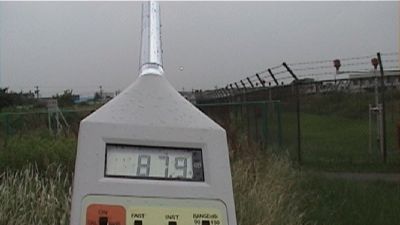
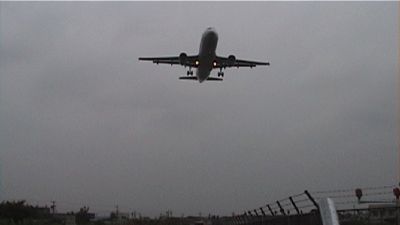
Aircraft noise was measured outside. Displayed level is not true. Because I
did not change the measurement range correctly, measurement has become
impossible.
When I changed the measurement range, sound level was about 76dBA.
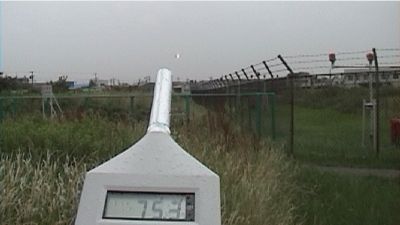
Sound level above 100dB could not be measured.
| TOP | STORE
| DSSF3
| RAE | RAD
| RAL | MMLIB
| FAQ
| Support | Contact Us |
If you have questions or comments about this page,
feel free to contact us by email ymec@ymec.com or by online
inquiry form.